


IPC360 Home
2.8402.00 Reviews
App Specs
- Version
- 8.10.1.0
- Updated On
- License
- Free
- Downloads
- 1,000,000+
- Developer
- Puwell Technology Inc
- Categories
- Video Players & Editors
- Platform
- Android, iOS
Screenshots
 Analysis by AppCompare
I tend to judge a home-camera app less by how impressive it sounds and more by whether I can get a useful view when I actually need one. IPC360 Home is designed to connect a phone with compatible panoramic cameras, so its appeal is practical: check a room remotely, look around a wider area, and use the camera as part of a household routine. It is a video-viewing and editing app by category, although its main role here is monitoring rather than making videos.
Where camera setup can get frustrating
The first hurdle is that the app is only one part of the setup. Your phone, the camera, the home network, and the instructions for the specific camera all need to line up. If the camera is not ready to pair or the network is unstable, repeatedly tapping through the app is unlikely to solve the underlying issue. I would start with the camera’s own setup instructions and keep the phone close by while pairing, rather than treating the app as a standalone security system.
It also helps to decide where you want the camera to point before you begin. A panoramic view can cover more of a room than a fixed view, but furniture, walls, and doorways still shape what the camera can see. I would test the view from the places I expect to check most often—such as an entryway or the area where a pet rests—before relying on it for a daily routine.
Simple checks before trying again
If setup stalls, I would check the basics in a calm order: confirm the camera has power, make sure the phone is connected to the intended home network, and follow the camera’s pairing steps from the beginning. If the phone has moved onto another network, the camera is unplugged, or the router is having trouble, the app may not be able to establish a reliable connection. Restarting the app after checking those conditions is more useful than repeating the same pairing attempt without changing anything.
For a shared household, I would also agree on who is responsible for the initial setup and where the camera should be placed. That avoids a common kind of confusion: one person expects a view of the front door while another has aimed the camera toward a different part of the room. A short test while someone is at home can confirm that the intended area is visible before anyone depends on remote viewing.
First Impressions: User-Friendly Interface
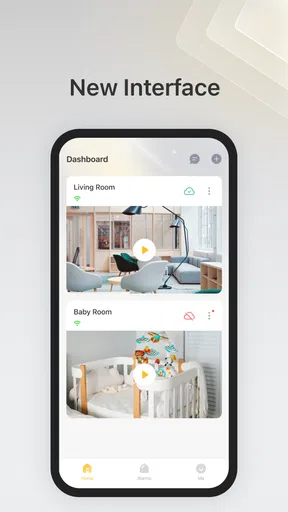
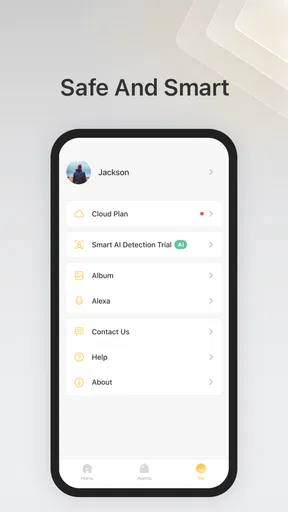
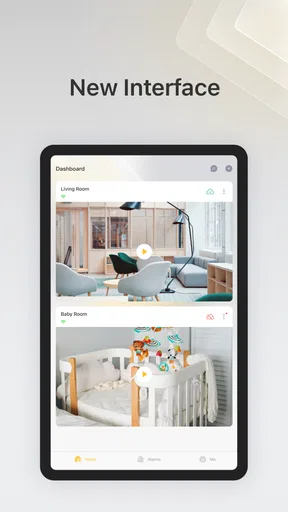
When I first launched the IPC360 Home app, I was greeted with a clean and intuitive interface. Now, I’m not saying that I’m a tech wizard, but navigating this app was a breeze. Everything is laid out in a way that even my grandma could figure out. The home screen gives you quick access to all your connected cameras, which is super convenient.
Setting up cameras was straightforward. The app provides a step-by-step guide that makes the process painless. I had my security setup ready in no time, and I didn’t even break a sweat!
Worth Reading Before You Choose

EA SPORTS FC Mobile 26 Is a Bigger Football Game, but It Takes Time

Flipboard Shows What News Apps Must Do Beyond the Feed

Switching to Android Auto Means Rethinking Your Driving Routine

Google Calendar Makes a Crowded Week Easier to Manage

Ludo King Makes the Most of the Minutes Between Plans

Baby Panda World Brings Quick Play to Modern Phones, but Its Game Library Feels Busy
Features That Stand Out
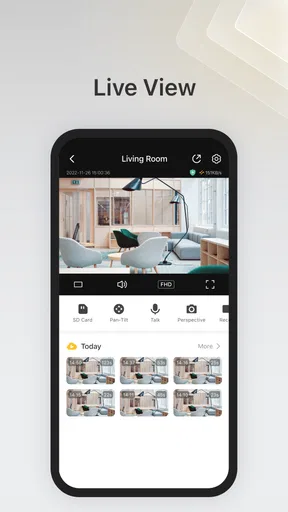
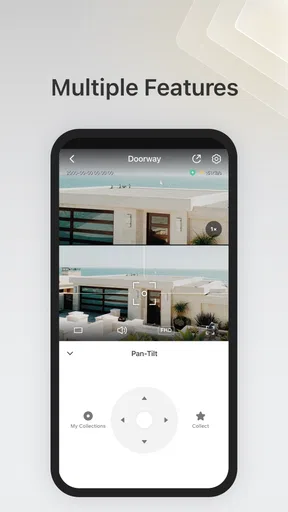
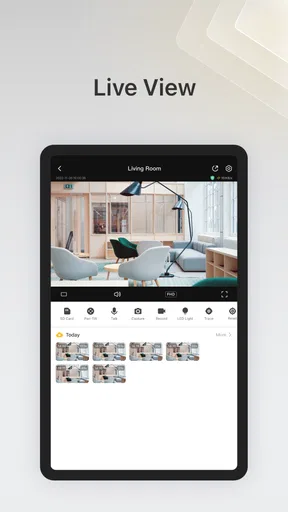
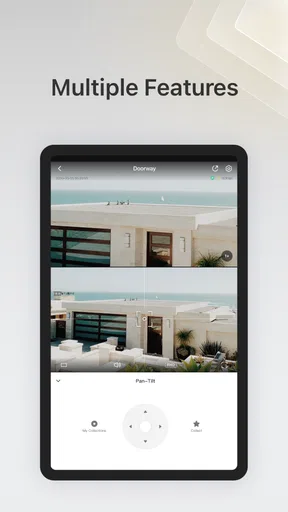
One of the standout features of IPC360 Home is the 360-degree panoramic view. It’s like having eyes in the back of your head—talk about peace of mind! The app allows you to pan, tilt, and zoom with a simple swipe on your screen. This level of control is perfect for checking every nook and cranny of your home.
Another feature that caught my attention is the real-time alerts. If there’s any movement detected by your cameras, you’ll get a notification right away. This means you can act fast if something seems off. It’s like having a security guard in your pocket.
Plus, the two-way audio feature is a sweet bonus. You can communicate with anyone on the other side of the camera. It’s great for checking in on your pets or letting delivery folks know where to leave a package.
Performance and Reliability
In terms of performance, I found the app to be quite reliable. The video quality is crystal clear, thanks to its HD streaming capability. I didn’t encounter any major lags or buffering issues, which is a huge relief. Nothing’s worse than a security app that doesn’t deliver when you need it the most.
The app also supports multiple camera connections, which is handy if you have a larger property. You can switch between different cameras seamlessly, ensuring you have a comprehensive view of your surroundings.
Using alerts and audio in everyday life
Alerts are most useful when they answer a specific question, not when they become a constant stream of interruptions. I would choose a camera position where movement matters—for example, a room that should usually be empty—then see whether the notifications fit the household’s normal activity. Pets, family members, and routine movement can all make an alert less meaningful, so the practical test is whether a notification prompts a useful check rather than simply adding noise to the day.
Two-way audio can make a quick interaction easier, but I would treat it as a convenience, not a substitute for being present. If I wanted to reassure a pet or give a delivery person a simple instruction, speaking through the camera could help. For anything sensitive or time-critical, I would use a direct call or another dependable method instead; a camera connection is only useful while both the app and the network are cooperating.
Recovering a view when something goes wrong
If a camera stops appearing in the app, I would first separate a viewing problem from a setup problem. Check whether the camera still has power and whether the home internet is working, then reopen the app and try the camera again. If the live view returns, the interruption may have been temporary. If it does not, retrace the camera’s connection steps rather than assuming that reinstalling the app is the answer.
When the video is slow or keeps stopping, I would compare the experience from the same phone in another part of the home. A weak connection near the camera or phone can make live viewing feel unreliable even when the app itself opens normally. Moving closer to the router for a quick test can help narrow down the cause. It is a diagnostic check, not a promise that a particular network change will fix every camera.
For a multi-camera home, I would test each view separately instead of checking only the first one on the home screen. That makes it easier to notice whether the issue affects one camera or the whole setup. It also gives the household a clearer fallback: if one camera is temporarily unavailable, you know which other views are still accessible.
When the app may not be the problem
A phone app cannot compensate for a camera that has lost power, a home network that is offline, or a camera pointed at the wrong area. That distinction matters because remote monitoring can create a false sense of certainty if nobody checks that the view is current and useful. I would occasionally open each camera while at home, confirm the important area is still in frame, and make sure the household knows what the app can and cannot tell them.
I would not use a camera notification as proof that a home is secure, or as the only plan for an emergency. It can help me notice activity and decide whether to check in, but it does not replace a proper alarm, a neighbor, or emergency services where those are needed. This is especially important if a person expects continuous professional monitoring: a phone-based camera app is a different kind of tool.
Performance and Reliability
In terms of performance, I found the app to be quite reliable. The video quality is crystal clear, thanks to its HD streaming capability. I didn’t encounter any major lags or buffering issues, which is a huge relief. Nothing’s worse than a security app that doesn’t deliver when you need it the most.
The app also supports multiple camera connections, which is handy if you have a larger property. You can switch between different cameras seamlessly, ensuring you have a comprehensive view of your surroundings.
A realistic routine for me would be checking the living room before leaving, then opening the relevant camera briefly if I am wondering whether a pet has settled or a delivery has arrived. I would not keep the live feed open all day; short, purposeful checks are easier to fit into normal phone use and make it clearer when an alert deserves attention. If I were caring for someone at home, I would first discuss camera placement and expectations with them rather than assuming that monitoring is automatically welcome.
Compared with a basic fixed-view camera app, the panoramic controls are the main reason I would consider this one: being able to look around a room can be more useful than seeing only the slice covered by a fixed lens. On the other hand, someone who wants a simple, stationary view may not benefit from those controls and might prefer an app built around a camera they already own. If the priority is a full alarm system or a monitored security service, I would compare those options directly rather than expecting a camera-viewing app to provide the same protection.
Room for Improvement
Of course, no app is perfect. While IPC360 Home offers a lot, there are a few areas where it could improve. For instance, some users might find the subscription model for advanced features a tad pricey. However, considering the security it provides, it might be a worthwhile investment.
Additionally, while the app’s design is clean, a few more customization options would be nice. People love to personalize their tech, and having extra themes or layout choices could enhance user experience.
The audience feedback also encourages a measured approach. The app has an average rating of 2.8 from around 6,700 ratings, alongside roughly 399 written reviews, so I would not assume that every household will have the same smooth experience. Those figures do not tell me exactly which issue a particular person will face, but they are a reason to test the camera and app together before building an important routine around them.
Who should choose it, and what it costs to explore
IPC360 Home is free to install, is rated for Everyone, and is developed by Puwell Technology Inc. It has passed one million installs and was released on March 19, 2020; version 8.10.1.0 is the current version, and the stated minimum operating system is Android 7.0. In-app purchases range from $1.99 to $339.99 per item, so I would check the purchase details carefully before paying for anything and decide whether the feature is genuinely needed for my camera setup.
I would recommend trying it to someone who already has a compatible panoramic camera and wants phone-based access to rooms at home, especially if the ability to look around a space is useful. It is less compelling for someone who has not chosen a camera yet and wants to compare several brands, or for someone who expects one app to deliver professional security monitoring. Before buying hardware or a paid option, I would make sure the camera’s instructions match the setup I need and that I am comfortable with the app’s everyday workflow.
Final Thoughts
In conclusion, IPC360 Home is a robust app that transforms your smartphone into a powerful security tool. With its user-friendly interface, impressive features like 360-degree view and real-time alerts, it’s definitely a contender for anyone looking to beef up their home security.
Whether you’re keeping an eye on your pets or wanting to ensure your home’s safety, this app delivers on its promises. Give it a whirl and see how it fits into your security routine. After all, it’s better to be safe than sorry!
Pros
- User-friendly interface enhances navigation.
- High-quality video streaming for clear monitoring.
- Customizable motion detection alerts.
- Night vision supports low-light conditions.
- Multiple camera support for broader coverage.
Cons
- Requires stable internet for optimal use.
- Limited free cloud storage options.
- App notifications can be delayed.
- Occasional connectivity issues with cameras.
- In-app purchases can add up quickly.
FAQs for IPC360 Home
What features does IPC360 Home offer for home security?
IPC360 Home provides a comprehensive suite of features to enhance home security. These include high-definition video streaming, real-time alerts, and motion detection. Users can also enjoy two-way audio, allowing communication through the app. Additionally, the app supports night vision, ensuring clear visuals even in low light conditions.
Is IPC360 Home compatible with both Android and iOS devices?
Yes, IPC360 Home is designed for compatibility with both Android and iOS platforms. This ensures that users can seamlessly integrate the app into their preferred mobile ecosystem, making it accessible and convenient for a wide range of users. Check the app store for specific version requirements.
How does the subscription model for IPC360 Home work?
IPC360 Home offers a free version with basic features, but to access premium functionalities like extended cloud storage and advanced analytics, users need to subscribe to a paid plan. The subscription model is flexible, with options for monthly or annual payments, providing users the choice to select what best fits their needs.
What are the privacy measures in place for IPC360 Home?
IPC360 Home prioritizes user privacy, employing encryption protocols to secure video feeds and personal data. The app also offers customizable privacy settings, allowing users to control who has access to their camera feeds. It's important to review these settings to ensure maximum security and privacy of your data.
How easy is it to set up and use IPC360 Home?
Setting up IPC360 Home is straightforward, with a user-friendly interface guiding users through the process. The app includes a step-by-step setup tutorial, making it accessible even for those new to smart home technology. Once configured, navigation and management of features are intuitive, enhancing user experience.


